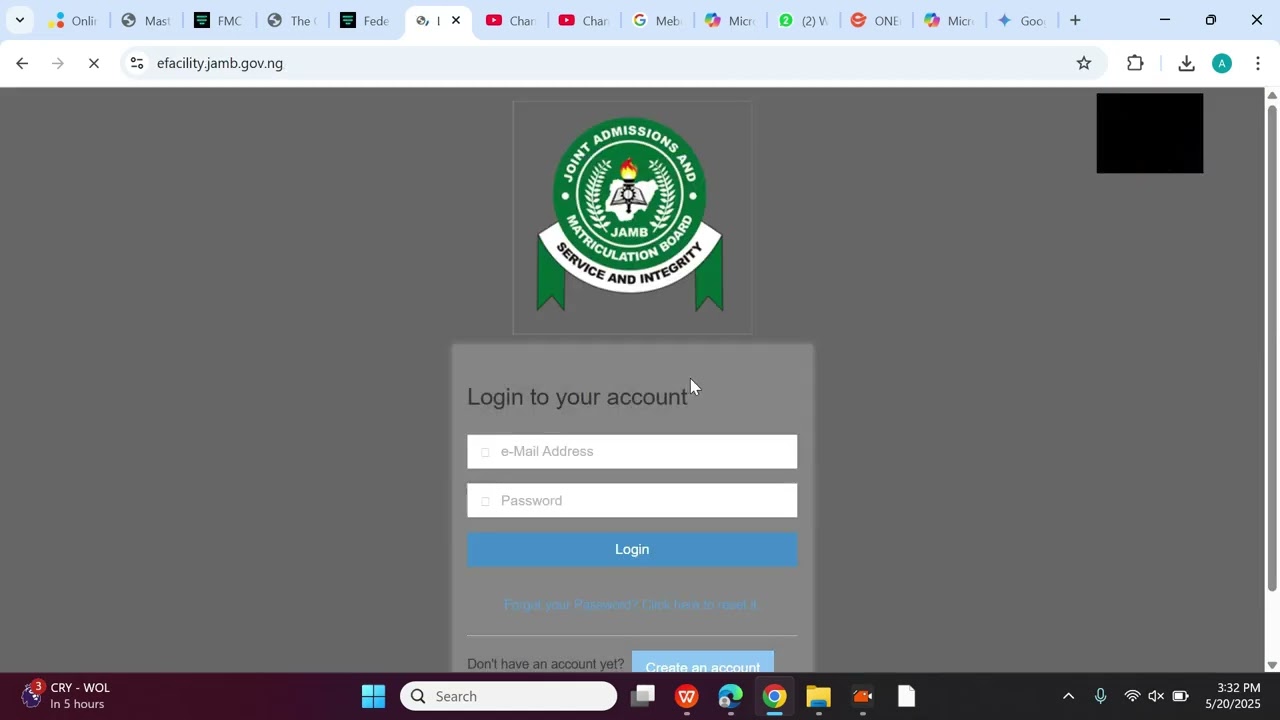
After you finish your JAMB exam, the next big moment is checking your result. You might feel nervous, but checking your JAMB result online is a very simple process. This guide will show you the exact steps to follow using your phone or computer. You do not need to pay anyone to check your result if you follow these official steps.
The most important thing is to use the official JAMB portal. Do not use any other website, as they might be fake. Also, have your JAMB registration number ready before you start. This number is the key to accessing your result.
What You Need Before You Start
To check your JAMB result online for 2025, you need just a few things. Make sure you have them ready so the process goes smoothly.
First, you need a device with internet. This can be your smartphone, a tablet, or a computer. Second, you need your JAMB registration number. This is the number you used during your exam registration. If you have the email address you used during registration, it can also be helpful. Finally, you need patience. Sometimes the website is very busy when many people are checking results.
Finding Your JAMB Registration Number
Your JAMB registration number is very important. You cannot check your result without it. If you have lost it, do not worry. You can find it in a few places.
Check the text message (SMS) that JAMB sent to your phone when you registered. Also, check the printed slip you got from the exam centre or the one you printed at home. The number usually looks like this: 12345678GB. If you still cannot find it, you can email JAMB support for help.
Step-by-Step Guide to Check Your Result
Now, let’s go through the actual steps. We will show you the main way to check, and also how to check with just your phone number if you do not have your email.
Remember, the official JAMB portal for checking results is the only place you should go. The address is: https://www.jamb.gov.ng/Efacility. Bookmark this page on your phone or computer.
Method 1: Using the Official JAMB Portal (Best Way)
This is the standard and most reliable method to check your JAMB result online with your registration number.
First, open your internet browser (like Chrome, Safari, or Firefox) and go to the JAMB portal: **https://www.jamb.gov.ng/Efacility**. On the homepage, look for the button that says “Check UTME 2025 Results” or something similar. Click on it.
A new page will open. It will ask you to enter your JAMB registration number or your email address. Type your registration number carefully. Then, click on the button that says “Check My Result”. Your result will load on the screen. You can then print it or save it as a PDF on your device.
Method 2: How to Check JAMB Result Online With Phone (SMS)
If you cannot access the website easily, you can use your mobile phone. This method uses a simple text message (SMS). You do not need internet data for this.
On your phone, open your messaging app (the one you use for normal texting). Create a new text message. In the message body, type the word **RESULT** (in capital letters). Send this text message to **55019**.
You will receive a reply SMS almost immediately. The message will show your JAMB score and the details of your subjects and grades. This is a very quick way to check your JAMB result online with your phone. Note that your phone number must be the one you used during JAMB registration for this to work.
What to Do If You Have Problems
Sometimes, things do not go as planned. The website might be slow, or you might see an error message. Here is what to do in those situations.
Do not panic. The first thing to try is to wait and try again later. Sometimes, too many people are checking at the same time, and the server is busy. If you get an error like “Result Withheld” or “Result Not Yet Released,” it means JAMB is still processing results for some candidates. Just check again the next day.
Error Messages and Their Meanings
You might see some messages you do not understand. Here is a simple explanation for common ones.
“Invalid Registration Number”: This means the number you typed is wrong. Check the number and type it again slowly. Make sure there are no spaces.
“Result Not Found”: This could mean your result is not ready yet, or there is a problem with your registration details. Wait for 24 hours and try again.
“You Have No Result Yet”: This is normal in the early hours after results start coming out. It simply means your specific result is still being processed. Please check back in a few hours.
What If You Forgot Your Email?
Many students worry about how to check JAMB result online without email. It is very easy. You do not actually need your email address to check your result.
You can use your JAMB registration number alone on the portal. Or, you can use the SMS method by sending **RESULT** to **55019** from your registered phone number. Your email is only one option, not a requirement.
After Checking Your Result
Once you see your score, there are a few important next steps you should take. Your result slip is an important document.
First, you should print your result slip from the JAMB portal. This printed copy is useful for Post-UTME screenings and other university admissions processes. To print, look for the print button on the result page when it is open on your computer.
Printing and Saving Your Result Slip
After you check your JAMB result online, it is good to save a copy. On the result page, you will see an option to “Print Result Slip”. Click it.
If you are using a computer connected to a printer, you can print it directly. If not, you can save it as a PDF file. On your phone or computer, choose “Save as PDF” when the print menu opens. Then, you can send this PDF file to a printing shop or save it for future use.
Checking Your Admission Status Later
Your JAMB result is just the first step. Later, you will use the same JAMB portal to check if a university has offered you admission.
Do not lose your login details. You will need to go to the JAMB CAPS (Central Admission Processing System) on the same e-facility portal to accept or reject any admission offer you get. So, keep your registration number and email safe.
People Also Ask
Is it free to check my JAMB result online?
Yes, it is free to check on the official JAMB portal. Do not pay anyone money to check your result for you. The SMS method to 55019 might cost you the normal rate for sending a text message (like ₦50), but that is all.
How long does it take for results to come out?
JAMB usually starts releasing results a few days after the last exam date. They release results in batches. If your result is not in the first batch, do not worry. Just keep checking every day.
Can I check my 2025 result in 2026?
Yes, you can. The results remain on the portal for a long time. You can check your JAMB result online 2025/26 anytime by following the same steps on the JAMB portal.
What if my score is wrong or I want to rewrite?
If you believe there is a mistake, you can apply for a result recheck through the JAMB portal. If you are not happy with your score, you can register again for the next exam to try and get a better score.
Do I need to buy a scratch card to check my result?
No! That is an old method. JAMB stopped using scratch cards many years ago. Everything is now done online for free on their portal or via SMS.